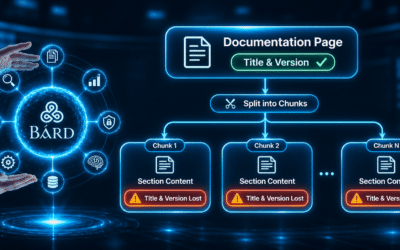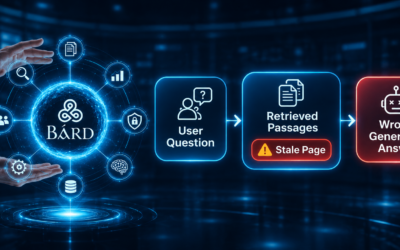
Documentation debt is the gap between what your documentation says and what your product actually does, plus everything that was never written down at all. You pay it down by inventorying what exists, fixing the pages that cost you most first, and changing your process so new releases stop adding to the pile.
The idea borrows from technical debt. Engineers take shortcuts to ship, knowing they will need to come back and tidy up. Documentation works the same way. Every release that ships without a docs update creates a small liability, and the interest shows up later as confused users, extra support load and slower onboarding.
What technical documentation debt looks like
Technical documentation debt usually takes a few forms:
- Outdated documentation. Pages that described the product accurately once, but no longer do.
- Missing documentation. Features, edge cases or workflows that were never documented.
- Knowledge held only in people. Answers that live in one engineer’s head or a private chat thread.
- Duplicate and conflicting pages. Several versions of the same answer, each slightly different.
- Structural debt. Content that exists but is hard to find because the structure grew without a plan.
Like code debt, some of it is deliberate and some is accidental. A team might choose to ship a beta with minimal docs. That is a reasonable trade, as long as someone records the debt and plans to pay it back.
Signs your team has documentation debt
You rarely see documentation debt directly. You see its effects. Watch for these signals.
Support tickets on documented features
If customers open tickets about features that already have docs, the docs are failing. The page may be outdated, hard to find, or written for the wrong audience. Support teams often know exactly which pages cause trouble.
Pages nobody owns
Ask who owns a sample of pages. If the answer is “the person who left last year” or a shrug, those pages are not being maintained. Unowned content ages without anyone noticing.
Version drift
Screenshots show an old interface. Parameter names in the API reference no longer match the code. Steps refer to menu items that moved. Version drift is one of the clearest signs that documentation maintenance has not kept pace with releases.
Workarounds in internal channels
When engineers answer the same question repeatedly in chat, or support keeps a private notes file because the public docs are unreliable, knowledge is flowing around the documentation instead of through it.
New hires learn by asking
If onboarding depends on shadowing a colleague rather than reading, internal documentation debt is probably high.
How to inventory documentation debt
You cannot prioritize what you have not measured. A practical inventory captures a few fields for every page.
| Field | What to record |
| Page and URL | Title and location |
| Owner | A named person or team, or “none” |
| Last reviewed | When someone last checked it against the product |
| Product area | The feature or module it describes |
| Accuracy | Current, partly outdated, or wrong |
| Demand signal | Related support tickets, search queries or page views |
| Gap notes | What is missing or only known by people |
Fill this in with help from support, product and engineering. Support knows which pages fail. Engineers know which features changed. Product knows what is coming next.
Do not forget the knowledge that is not written anywhere. Short interviews with the people who answer the most questions will surface gaps that a page-by-page review never finds.
How to prioritize what to fix first
Not all debt is equal. Prioritize by combining two questions: how much does this page matter, and how wrong is it?
- Fix wrong content on high-demand pages first. These are likely to cause the most failed attempts and the most tickets.
- Fill gaps behind frequent support questions next. Every repeated question is a candidate page.
- Assign owners to unowned areas. Ownership is cheap and prevents the same debt returning.
- Merge duplicates. Pick one source of truth, redirect the rest.
- Archive what nobody needs. Removing dead pages is a valid way to reduce debt.
- Leave low-impact cosmetic fixes for later. An old screenshot on a rarely visited page can wait.
Work in batches tied to product areas. That makes progress visible and keeps reviewers focused on one part of the product at a time.
How to stop new documentation debt
Paying down debt only helps if you stop adding to it. That means changing process, not just running a cleanup.
Put docs in the definition of done
A feature is not done until its documentation is updated. Add a docs check to your definition of done, your pull request template or your release checklist. If docs are optional, they will be skipped under pressure.
Link reviews to releases
Schedule documentation review as part of each release cycle rather than as an occasional project. Before a release, list the pages affected by the changes. After it ships, confirm they were updated.
Make ownership explicit
Every section should have a named owner who receives change notices for their area. Ownership should survive reorganizations and staff changes.
Track aging content
Record a last-reviewed date on every page and report on content that has not been checked in a while. A regular report showing what changed, what is aging and where users fail to find answers keeps debt visible.
Capture knowledge as it is created
When an engineer explains something in a meeting or a chat thread, that is the cheapest moment to document it. Build a habit of turning repeated answers into pages.
Frequently asked questions
What is documentation debt?
Documentation debt is the accumulated gap between your documentation and reality. It includes outdated pages, missing content, duplicates and knowledge that exists only in people’s heads. Like technical debt, it builds when teams ship without updating docs, and the cost shows up later as support tickets, slower onboarding and users who cannot find reliable answers.
How do you reduce technical documentation debt?
Start with an inventory of every page, its owner, accuracy and demand. Fix incorrect content on high-traffic pages first, then fill gaps behind frequent support questions. Assign owners, merge duplicates and archive dead pages. To keep debt from returning, add documentation to your definition of done and tie reviews to your release cycle.
How often should documentation be reviewed?
Review documentation whenever the product changes, not on a fixed calendar alone. Linking review to each release catches changes while they are fresh. On top of that, schedule a periodic check of pages that have not been reviewed recently, prioritizing high-traffic content. The right rhythm depends on how often you ship.
Paying down documentation debt for good
Documentation debt is normal. Letting it grow unseen is the real problem. With a clear inventory, a priority order and release-linked reviews, a team can turn it from a constant drag into a managed backlog.
For more on keeping content current, read our guide to technical documentation maintenance, or see how Bárd works, including the audit most clients start with. If you want help mapping your own debt, book an audit or a conversation.